install RBoot on ASUS KGPE-D16 server/workstation board
| Specifications | |
|---|---|
| Manufacturer | ASUS |
| Name | KGPE-D16 |
| Released | 2010 |
| Chipset | AMD RD890S-SB700S |
| CPU | 2x Socket G34; Opteron 6200/6300 |
| Graphics | ASPEED AST2050 |
| Memory (max/cpu) | 32GB DDR3 SODIMMs (4x8 GB) ECC |
| Architecture | x86-64-v2 (+ older) |
| Original boot firmware | AMI BIOS |
| Intel ME/AMD PSP | None |
| Flash chip | DIP-8 512KiB |
Get the ROM image
Download from release
Build from source
./mk -b coreboot asus_kgpe_d16_2mbReplacable and upgradeble flash chip sizes possible, if done, adjust the 2mb (max 16mb) to it
Internal/Software Flashing
Default RBoot firmwares updatable.
External/Hardware Flashing
The default ASUS firmware write-protects the flash, so you have to remove the chip and re-flash it using external hardware.
It has a 25XX NOR flash (SPI protocol) in a P-DIP 8 socket, which looks like this:
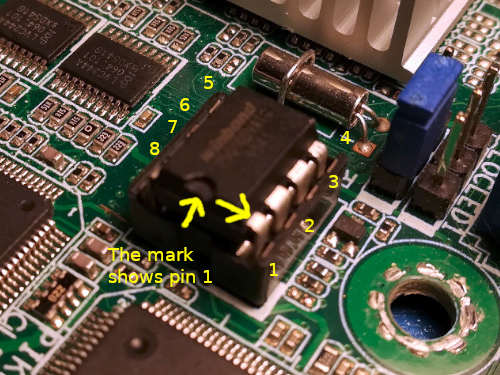
The default chip is a 2MiB one, but we recommend upgrading it to a 16MiB chip.
The basic guide is not enough for this board, read the full guide as well.
Device Unique Properties
Physically backup up vendor firmware
Dumping the factory bios, then hot-swapping the flash to keep to flash RBoot on it, and keep the original too.
Form factor
- SSI EEB 3.61 (12“x13”)
IPMI iKVM module add-on
IPMI iKVM module (optional add-on card) uses proprietary firmware. Since it’s for remote out-of-band management, it’s theoretically a backdoor similar to the Intel Management Engine. Fortunately, unlike the ME, this firmware is unsigned which means that a free replacement is theoretically possible. For now, the RBoot project recommends not installing the module. This project might be interesting to derive from, for those who want to work on a free replacement. In practice, out-of-band management isn’t very useful anyway (or at the very least, it’s not a major inconvenience to not have it).
Flash chips
The flash is hot-swappable in a 25xx NOR, P-DIP8 form factor.
DO NOT hot-swap the chip with your bare hands. Use a P-DIP 8 chip extractor. These can be found online. See http://www.coreboot.org/Developer_Manual/Tools#Chip_removal_tools
Ideally, you should not hot-swap. Only remove the IC when the system is powered down and disconnected from mains.
Graphics
Text-mode works with ast2050. See #graphics
Expanded_Specifications
Markdown file for this page: https://rboot.org/docs/install/kgpe-d16.md
This HTML page was generated by the Rboot Static Site Generator.