| ***Specifications*** | |
|----------------------------|------------------------------------------------|
| **Manufacturer** | ASUS |
| **Name** | KGPE-D16 |
| **Released** | 2010 |
| **Chipset** | AMD RD890S-SB700S |
| **CPU** | 2x Socket G34; Opteron 6200/6300 |
| **Graphics** | ASPEED AST2050 |
| **Memory (max/cpu)** | 32GB DDR3 SODIMMs (4x8 GB) ECC |
| **Architecture** | x86-64-v2 (+ older) |
| **Original boot firmware** | AMI BIOS |
| **Intel ME/AMD PSP** | None |
| **Flash chip** | DIP-8 512KiB |
### Get the ROM image
**[Download](../../download.md) from release**
**[Build](../build/) from source**
./mk -b coreboot asus_kgpe_d16_2mb
*Replacable and upgradeble flash chip sizes possible, if done, adjust the 2mb (max 16mb) to it*
### Internal/Software Flashing
**Default RBoot firmwares [updatable](../install/simplified-sw-flashing.md).**
### External/Hardware Flashing
The default ASUS firmware write-protects the flash, so you have to remove the
chip and re-flash it using external hardware.
It has a 25XX NOR flash (SPI protocol) in a P-DIP 8 socket, which looks like
this:
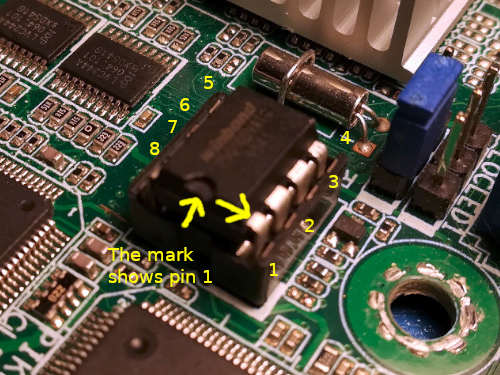
The default chip is a 2MiB one, but we recommend upgrading it to a 16MiB chip.
The basic [guide](../install/simplified-hw-flashing.md) is not enough for this board,
read the [full guide](../install/spi.md) as well.
### Device Unique Properties
#### Physically backup up vendor firmware
Dumping the factory bios, then hot-swapping the flash to keep to flash RBoot on it, and keep the original too.
#### Form factor
- SSI EEB 3.61 (12"x13")
#### IPMI iKVM module add-on
IPMI iKVM module (optional add-on card) uses proprietary firmware.
Since it's for remote out-of-band management,
it's theoretically a backdoor similar to the [Intel Management Engine](../../faq.md#intelme).
Fortunately, unlike the ME,
this firmware is unsigned which means that a free replacement is theoretically possible.
For now, the RBoot project recommends not installing the module.
[This project](https://github.com/facebook/openbmc) might be interesting to derive from,
for those who want to work on a free replacement.
In practice, out-of-band management isn't very useful anyway
(or at the very least, it's not a major inconvenience to not have it).
#### Flash chips
The flash is hot-swappable in a 25xx NOR, P-DIP8 form factor.
*DO NOT hot-swap the chip with your bare hands. Use a P-DIP 8 chip
extractor. These can be found online. See
*
Ideally, you should not hot-swap. Only remove the IC when the system is
powered down and disconnected from mains.
#### Graphics
Text-mode works with ast2050. See [\#graphics](#graphics)
### Expanded_Specifications
| ***Specifications*** | |
|----------------------------|------------------------------------------------|
| **Manufacturer** | ASUS |
| **Name** | [KGPE-D16](https://web.archive.org/web/20210206181231/https://www.asus.com/uk/Commercial-Servers-Workstations/KGPED16/specifications/) |
| **Released** | 2010 |
| **Chipset** | AMD [RD890S-SB700S](https://en.wikipedia.org/wiki/AMD_800_chipset_series#Southbridges) |
| **CPU** | 2x Socket G34; [Opteron 6200/6300](https://en.wikipedia.org/wiki/List_of_AMD_Opteron_processors#Opteron_6300-series_%22Abu_Dhabi%22_(32_nm)) |
| **Memory (max/cpu)** | 128GB DDR3 SODIMMs (8x16 GB) ECC |
| **Graphics** | [ASPEED AST2050](https://theretroweb.com/chips/5700) |
| **Networking** | 2x Intel 82574L |
| **Expansion Slots** | 5x PCI-E 2.0: 3x x16, x16 wired in x8, x8 wired in x4, PCI, PIKE |
| **Storage connectors** | 6x SATA II (4x red, 2x black), 8x SAS (with PIKE) |
| **Other Connectors** | USB-A 2.0, Headers: TPM, SCOM, BMC, 3x dual USB 2.0, 2x SMBus, PS/2 |
| **I/O Ports on Back** | 2x PS/2, 3x RJ-45 1GbE (Ethernets); BMC + 2 normal, SCOM, VGA, 2x USB 2.0 |
[//]: # "SPDX-License-Identifier: GFDL-1.3-or-later"