Install RBoot on HP Elite 8200 SFF/MT and 6200 Pro Business
!!BACKUP everything!! just in case something fails.
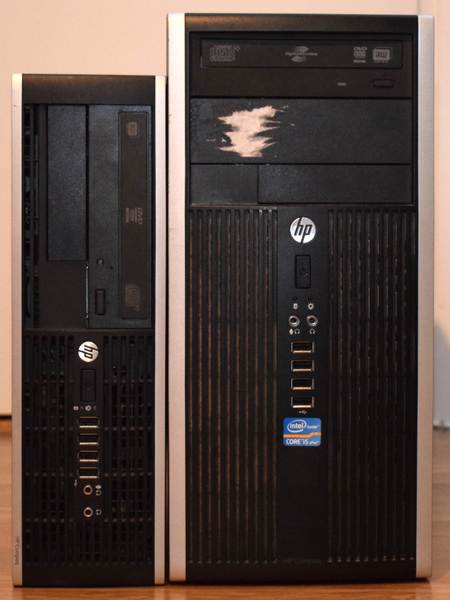
| Specifications | |
|---|---|
| Manufacturer | HP |
| Name | Compaq 8200 Elite SFF |
| Compaq 8200 Elite MT | |
| Released | 2011 |
| Chipset | Intel Q67 |
| CPU | Intel Sandy/Ivy Bridge |
| Graphics | Intel HD Graphics or PCI-e low profile card |
| Memory | Up to 32GB (4x8GB) |
| Architecture | x86-64-v2 (+ older) (v1 for Sandy) |
| Intel ME/AMD PSP | Present, |
| Flash chip | SOIC-8 8MiB |
libre BIOS/UEFI firmware
This document will teach you how to install RBoot, on your HP Elite 8200 SFF desktop motherboard. RBoot is a Free Software project that replaces proprietary BIOS/UEFI firmware.
Brief board info
Download from release
https://support.hp.com/gb-en/product/hp-compaq-8200-elite-small-form-factor-pc/5037931
MT is an identical board with a larger chassis and more powerful power supply:
https://support.hp.com/gb-en/product/hp-compaq-8200-elite-desktop-pc-series/5037940
Build from source
Disable security before flashing
./mk -b coreboot hp_elite_8200_sff_4mb_uefiSee: Disabling /dev/mem protection
Install RBoot
You can actually just compile the RBoot ROM for this, and flash the entire ROM.
Internal flashing from OEM BIOS is possible by setting a jumper on the board. Step by step instructions for this are below.
The coreboot project proper has technical details on why this works if you are interested. It also has external flashing instructions if you need to recover from an unbootable BIOS:
https://doc.coreboot.org/mainboard/hp/compaq_8200_sff.html
You can build the images for it in RBoot like so:
./mk -b coreboot hp_elite_8200_sff_8mb_uefiFlash a ROM image
Software
Internal flashing not possible from factory firmware; you can still do it just fine, once RBoot is installed.
Use --ifd-i fdand then-i gbeand then-i bios` when flashing the RBoot image. This avoids overwriting Intel ME.
BE CAREFUL if flashing the IFD region on a system where the IFD region sizes differ from the factory default. Ditto BIOS region.
Internal flashing from vendor BIOS
Possible. Please make sure to only write the BIOS region; optionally write the IFD and GbE regions, but only flash the IFD region if it’s stock (factory), as the RBoot-provided IFD matches the vendor regions. If you previously changed them, adapt accordingly.
Do not, under any circumstance, overwrite the ME region.
HP 6200 Pro Business PC
According to this page from the vendor, HP BIOS updates are the same on both the 8200 SFF Elite and 6200 Pro Business desktop PCs; therefore, we believe that the RBoot config for 8200 SFF will also work on 6200 Pro Business PCs. That page is here: https://support.hp.com/fi-fi/drivers/selfservice/swdetails/hp-compaq-8200-elite-small-form-factor-pc/5037931/swItemId/vc-229778-2
The config for this board is courtesy of Riku Viitanen (Riku_V on RBoot IRC), who tested and confirmed the following functionality:
- Sandy Bridge (i5-2400) and Ivy Bridge (i5-3570S) CPUs
- 4x8 GB RAM (Sandy Bridge: 1333MHz, Ivy Bridge: 1600MHz)
- PS/2 keyboard and mouse
- USB keyboard
- Boot from USB and DVD
- Gigabit ethernet
- VGA and DisplayPort (Intel graphics), with libgfxinit (native video init)
- Headphone output, PC speaker
- S3 suspend, wake on USB keyboard
- lm_sensors outputs CPU core temperatures only
- Both PCIe x16 slots, external GPU works.
- PCI
- SATA
- USB ports
- Serial port (RS-232)
- Wake on LAN
At the time of adding this board to RBoot, the following is untested:
- Parallel port (internal header on the board)
- Floppy drive. The case has a spot for it, but I can’t find the header (P10).
According to the initial coreboot port from 2018, the following also works:
- EHCI debug (not enabled by RBoot configs)
- Native (libre) raminit with up to four DIMM modules (also tested by Riku and confirmed working, with 32GB RAM installed as 4x8GB)
TPM
According to git logs, TPM should work, and a commit from 2018 at revision ID 39d0e2a2cf45e28cdddd0fe0c88f94ce527ab1ef in coreboot makes the TPM visible to operating systems.
Markdown file for this page: https://rboot.org/docs/install/hp8200sff.md
This HTML page was generated by the Rboot Static Site Generator.