---
title: Install RBoot on HP Elite 8200 SFF/MT and 6200 Pro Business
x-toc-enable: true
...

**[!!BACKUP everything!!](./#howto-readwriteerase-the-boot-flash) just in case something fails.**

<div class="specs">
<center>
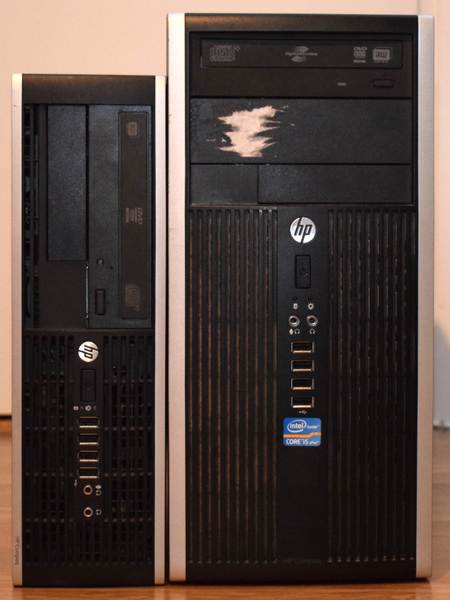
<img tabindex=1 title="From left to right: SFF and MT" class="p" src="https://av.rboot.org/hp8200sff/sff+mt.jpg" /><span class="f"><img src="https://av.rboot.org/hp8200sff/sff+mt.jpg" /></span>
</center>

| ***Specifications***      |                                             |
|---------------------------|---------------------------------------------|
| **Manufacturer**          | HP                                          |
| **Name**                  | Compaq 8200 Elite SFF                       |
|                           | Compaq 8200 Elite MT                        |
| **Released**              | 2011                                        |
| **Chipset**               | Intel Q67                                   |
| **CPU**                   | Intel Sandy/Ivy Bridge                      |
| **Graphics**              | Intel HD Graphics or PCI-e low profile card |
| **Memory**                | Up to 32GB (4x8GB)                          |
| **Architecture**          | x86-64-v2 (+ older) (v1 for Sandy)          |
| **Intel ME/AMD PSP**      | Present,                                    |
| **Flash chip**            | SOIC-8 8MiB                                 |

</div>

libre BIOS/UEFI firmware
------------------------------

This document will teach you how to install RBoot, on your
HP Elite 8200 SFF desktop motherboard.
RBoot is a [Free Software](https://www.gnu.org/philosophy/free-sw) project
that replaces proprietary BIOS/UEFI firmware.

### Brief board info

**[Download](../../download.md) from release**

<https://support.hp.com/gb-en/product/hp-compaq-8200-elite-small-form-factor-pc/5037931>

MT is an identical board with a larger chassis and more powerful power supply:

<https://support.hp.com/gb-en/product/hp-compaq-8200-elite-desktop-pc-series/5037940>

**[Build](../build/) from source**

Disable security before flashing
--------------------------------

	./mk -b coreboot hp_elite_8200_sff_4mb_uefi

See: [Disabling /dev/mem protection](../install/devmem.md)

Install RBoot
-------------------------

You can actually just compile the RBoot ROM for this, and flash the
entire ROM.

Internal flashing from OEM BIOS is possible by setting a jumper
on the board. Step by step instructions for this are below.

The *coreboot* project proper has technical details on why this works if
you are interested. It also has external flashing instructions if you need
to recover from an unbootable BIOS:

<https://doc.coreboot.org/mainboard/hp/compaq_8200_sff.html>

You can build the images for it in RBoot like so:

	./mk -b coreboot hp_elite_8200_sff_8mb_uefi

### Flash a ROM image

**Software**

**Internal flashing not possible from factory firmware; you can still do it
just fine, once RBoot is installed.**

Use `--ifd `-i fd` and then `-i gbe` and then `-i bios` when flashing the
RBoot image. This avoids overwriting Intel ME.

BE CAREFUL if flashing the IFD region on a system where the IFD region sizes
differ from the factory default. Ditto BIOS region.

Internal flashing from vendor BIOS
----------------------------------

Possible. Please make sure to only write the BIOS region; optionally write
the IFD and GbE regions, but only flash the IFD region if it's *stock* (factory),
as the RBoot-provided IFD matches the vendor regions. If you previously
changed them, adapt accordingly.

Do not, under any circumstance, overwrite the ME region.

HP 6200 Pro Business PC
-----------------------

According to this page from the vendor, HP BIOS updates are the same on both
the 8200 SFF Elite *and* 6200 Pro Business desktop PCs; therefore, we believe
that the RBoot config for 8200 SFF will *also* work on 6200 Pro Business
PCs. That page is here:
<https://support.hp.com/fi-fi/drivers/selfservice/swdetails/hp-compaq-8200-elite-small-form-factor-pc/5037931/swItemId/vc-229778-2>

The config for this board is courtesy of *Riku Viitanen* (`Riku_V` on RBoot
IRC), who tested and confirmed the following functionality:

* Sandy Bridge (i5-2400) and Ivy Bridge (i5-3570S) CPUs
* 4x8 GB RAM (Sandy Bridge: 1333MHz, Ivy Bridge: 1600MHz)
* PS/2 keyboard and mouse
* USB keyboard
* Boot from USB and DVD
* Gigabit ethernet
* VGA and DisplayPort (Intel graphics), with libgfxinit (native video init)
* Headphone output, PC speaker
* S3 suspend, wake on USB keyboard
* lm\_sensors outputs CPU core temperatures only
* Both PCIe x16 slots, external GPU works.
* PCI
* SATA
* USB ports
* Serial port (RS-232)
* Wake on LAN

At the time of adding this board to RBoot, the following is untested:

* Parallel port (internal header on the board)
* Floppy drive. The case has a spot for it, but I can't find the header (P10).

According to the initial coreboot port from 2018, the following also works:

* EHCI debug (not enabled by RBoot configs)
* Native (libre) raminit with up to four DIMM modules (also tested by Riku and
  confirmed working, with 32GB RAM installed as 4x8GB)

TPM
---

According to git logs, TPM should work, and a commit from 2018 at revision
ID `39d0e2a2cf45e28cdddd0fe0c88f94ce527ab1ef` in coreboot makes the TPM visible
to operating systems.

[//]: # "SPDX-License-Identifier: GFDL-1.3-or-later"


